 ARCH-Insight
Architecture, operations and teamwork,
in one secure workspace.
ARCH-Insight starts with AI-assisted Enterprise Architecture and keeps going: monitoring and incidents, helpdesk, projects with Kanban boards, documents and files, chat and email, working hours and finance. One platform, one login, your organisation's data.
Imports, exports and interfaces
- AI import from PDF, Word & Excel
- JSON import & export
- REST API & CLI
- MCP for ChatGPT, Claude & Gemini
- Microsoft Entra ID & SAML SSO
- PowerPoint export
See ARCH-Insight in Action
Screenshots from our own ARCH-Insight organisation: the product as it is today, not mock-ups.
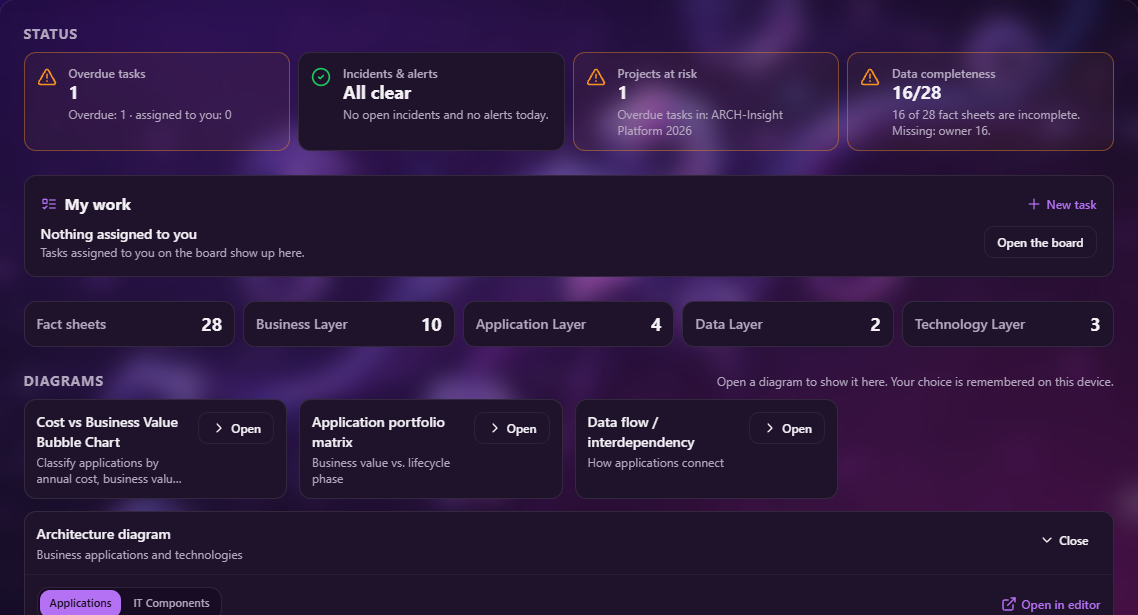
Dashboard
Status at a glance: overdue tasks, incidents and alerts, projects at risk and data completeness, with “My work”, fact sheet counts per layer and your diagrams.
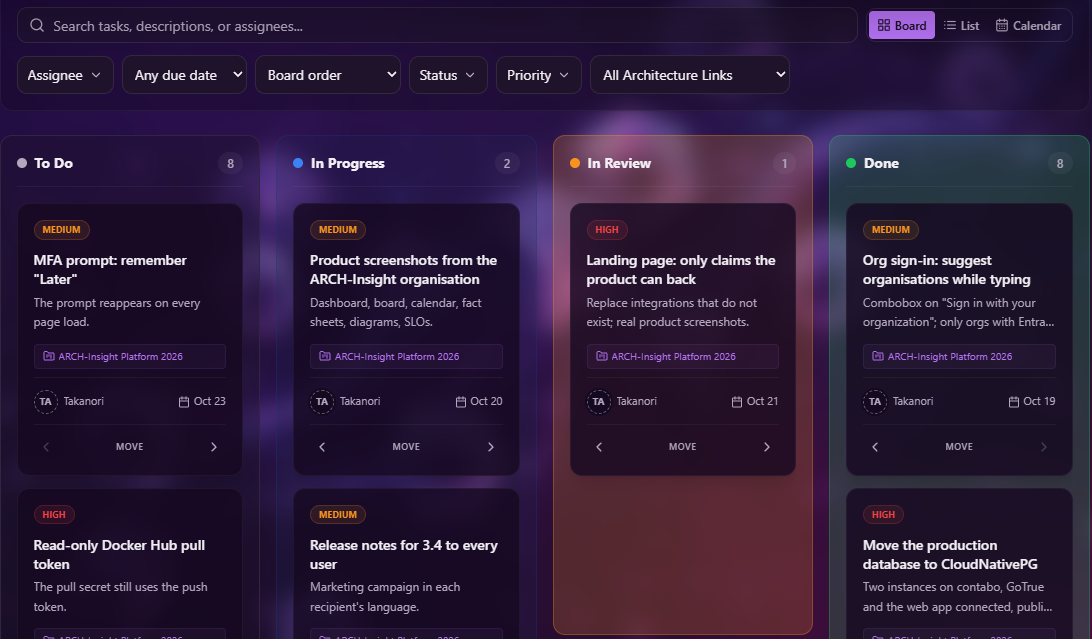
Kanban board
Tasks in To Do, In Progress, In Review and Done, with priority, project, assignee and due date. Switch to a list or the calendar.
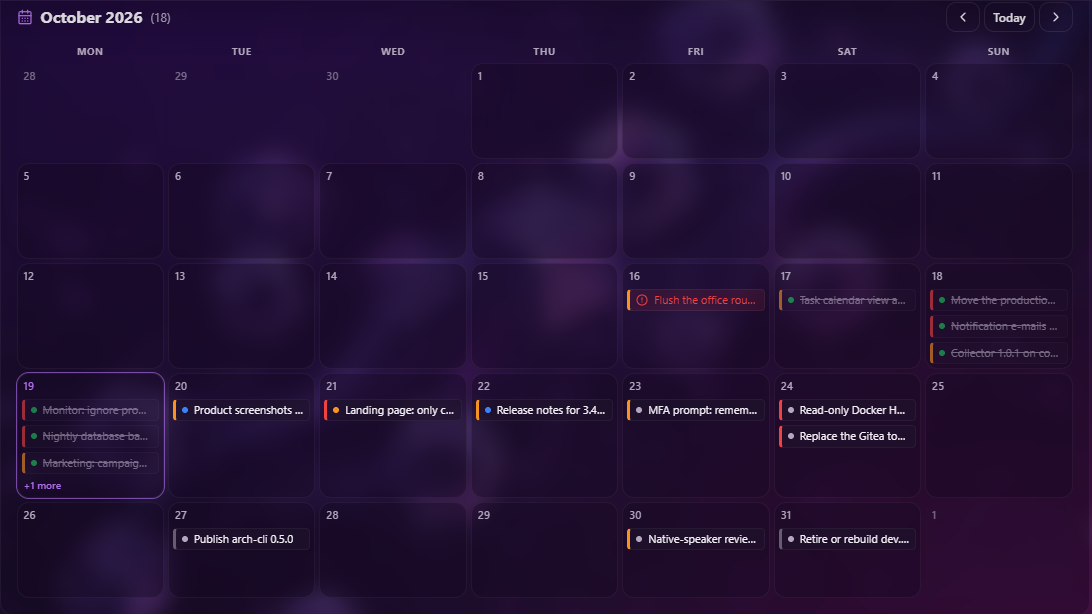
Calendar view
The same tasks by due date; an overdue task is marked in red.
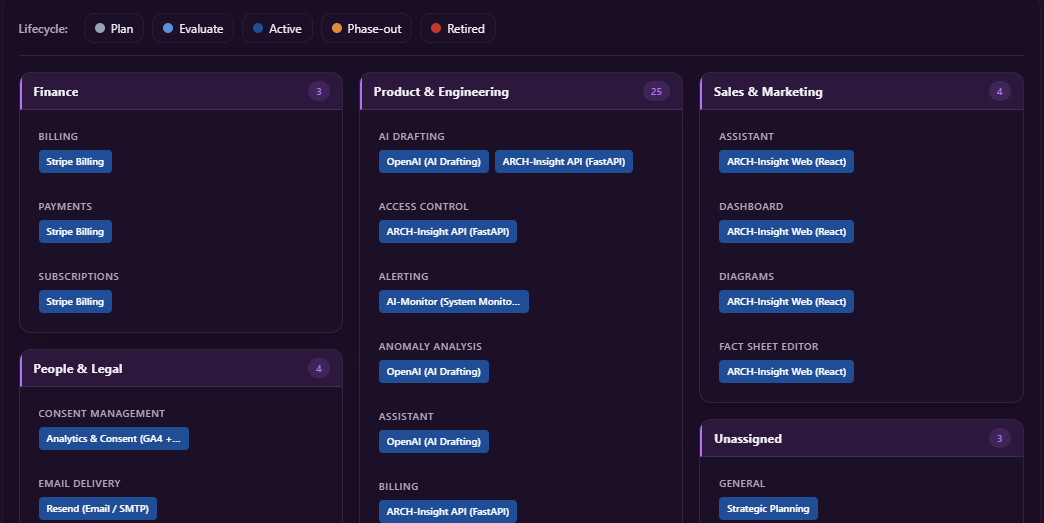
Capability map
Business capabilities grouped by domain, with the IT components that serve them, coloured by lifecycle phase.
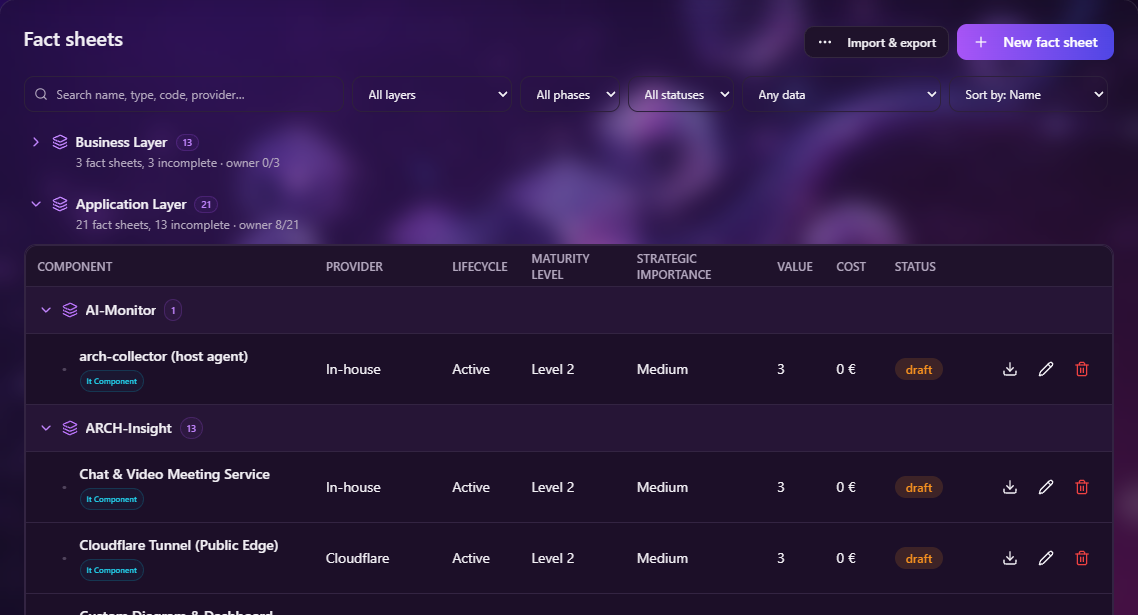
Fact sheets
Fact sheets grouped by layer and application, with provider, lifecycle, maturity, strategic importance, value and cost.
Why keeping architecture up to date feels like a losing battle.
The Fragmented Reality
Your architecture data is scattered across PowerPoint, Visio, Confluence, Excel, and CMDBs. Consolidating it manually for governance boards takes days.
Outdated Before It's Finished
Manual creation of viewpoints is too time-consuming. Diagrams become obsolete the moment project implementations drift from design.
The Communication Gap
Business stakeholders and management can't read complex, low-level technical diagrams. It's hard to justify EA value to leadership without the right presentation layer.
Enterprise Architecture, with AI where it helps.
Start from the documents you already have, turn them into a structured repository, and keep it current.
From documents to fact sheets
Upload PDF, Word or Excel files and the AI drafts fact sheets from them. Import and export fact sheets as JSON, or create them through the REST API and the command-line tool.
Impact: A repository of applications, capabilities, processes, data objects and technologies, without typing everything in by hand.
Ask in plain language
The built-in assistant answers questions about your application landscape. Our MCP server lets ChatGPT, Claude or Gemini read fact sheets, projects, tickets and monitoring data.
Impact: Answers without writing queries, in the assistant your team already uses.
Diagrams that stay in sync
Architecture, data-flow, portfolio, ArchiMate, BPMN and ER diagrams and a lifecycle roadmap, all drawn from your fact sheets. Edit a node and the fact sheet changes with it.
Impact: No redrawing. Describe a change in a prompt and the AI updates the fact sheets behind the diagram.
Reports for stakeholders
A stakeholder report with cost analysis, data coverage and AI recommendations, exported as a PowerPoint deck in your organisation's branding.
Impact: Give management a deck built from current data, not last quarter's slides.
Much more than architecture diagrams
Enterprise Architecture is where ARCH-Insight starts. Around it sit the tools your teams use every day, sharing one organisation, one set of roles and one search.
Enterprise Architecture
Fact sheets for applications, business capabilities and processes, data objects and technologies; editable diagrams; AI-drafted fact sheets and generated PowerPoint decks for stakeholders.
Monitoring & Incidents
A lightweight collector for host, Docker and Kubernetes metrics, logs and traces, plus health and network checks. Alerting with deduplication and routing, incidents, SLOs with error budgets, and AI that flags log anomalies and suggests fixes for alerts.
Helpdesk
Tickets in folders with relations and images, replies by email, and a support widget you can embed on your own website.
Projects & Agile
Projects with nested boards as Kanban, list or calendar, a burn-up progress chart, a weekly review, due-date reminders and “My work” on the dashboard.
Documents & Data
Documents you edit together, file storage with versions, spreadsheets with CSV/Excel import and read-only SQL import from your own PostgreSQL database, and full-text search across fact sheets, files and chat.
Communication
Team chat with video calls, a built-in email client, and notifications by push, email or SMS.
Marketing & Surveys
Email campaigns to mailing lists, drafted with AI, with inline images and a version in each recipient's language; plus internal and public surveys.
HR & Finance
Working hours recorded from planned work, and who is available when; accounts, transactions and ZUGFeRD e-invoices.
For the whole organisation: multi-tenant organisations with roles, per-organisation single sign-on with Microsoft Entra ID or SAML (“Sign in with your organization”), and an encrypted secrets vault your scripts can read from the CLI.
Three steps to a current architecture repository.
Bring in what you have
Upload existing documents (PDF, Word, Excel) and let the AI draft fact sheets, or import JSON in the app, with the CLI or through the REST API.
Review and complete
Data coverage shows which fact sheets are missing an owner, cost or lifecycle, and fact sheets nobody has updated in a while are flagged as stale — with a survey to ask their owners.
Share views and decide
Ask questions in plain language, open diagrams and the lifecycle roadmap, and hand stakeholders a generated PowerPoint deck.
Every feature, on every plan
The plans differ only in their limits, and a plan covers your whole organisation. No per-application licence, no annual commitment.
For organisations of up to 5 members.
- ✓ Up to 5 members
- ✓ 10 fact sheets
- ✓ AI on our self-hosted model
- ✓ 1 day of monitoring history
- ✓ 1 collector, read-only operations
- ✓ 200 campaign recipients / month
- ✓ Financed by ads
The first 5 members are free. Every member beyond that is €15 per month.
- ✓ As many members as seats you buy
- ✓ Unlimited fact sheets
- ✓ AI on a hosted model, 2M tokens / month
- ✓ 14 days of monitoring history
- ✓ 5 collectors, all operations
- ✓ 2,000 campaign recipients / month
- ✓ No ads
Every seat is billed, with no free seats, for the highest limits.
- ✓ As many members as seats you buy
- ✓ Unlimited fact sheets
- ✓ AI on a hosted model, 10M tokens / month
- ✓ 90 days of monitoring history
- ✓ Unlimited collectors, all operations
- ✓ 20,000 campaign recipients / month
- ✓ No ads
Your own infrastructure, your own model
- ✓ Deployment in your own infrastructure
- ✓ Local AI model, so requests stay in your network
- ✓ Single sign-on with Microsoft Entra ID or SAML
Frequently Asked Questions
What is ARCH-Insight?
Do we need to replace our current tools?
Is our data sent to external AI services?
Can it generate diagrams automatically?
How does it help non-technical stakeholders?
Will the AI make unauthorized changes to our architecture?
Does it support regulatory compliance?
One account, every device
The same workspace in the browser and as an installed app. Sign in once; your organisation's landscape follows you.
Every app opens the same workspace as the browser. Nothing is installed to use ARCH-Insight.
Stop documenting. Start deciding.
Start with the documents you already have and turn them into a clear, current picture of your IT landscape.